
Manage Your Account Online with MyFerrellgas
MyFerrellgas is the fastest and easiest way to manage your home or business account – anytime, anywhere. With MyFerrellgas you can order your next propane delivery, view your current and past invoice online, pay your bill online, chat with our Customer Service team, and more.
If you need assistance accessing your account, chat with us on Ferrellgas.com or call us at 888-337-7355.
Available Anytime Anywhere
FAQs
How do I register for a new MyFerrellgas account?
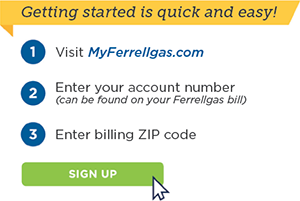
Before getting started, make sure you have your account number and billing ZIP code handy. If you need help finding your account number, check your most recent billing statement. Here are the step-by-step directions to register your account:
- Visit MyFerrellgas.com
- Click the “Register” button on the login page.
- When prompted, enter your account number and billing ZIP code.
- After entering your account details, select the appropriate contact name associated with your account. If your name is not listed, you can choose “Create New Contact” and enter your information.
- Create your login credentials:
- Username: Must not contain spaces or special characters (numbers are allowed).
- Password: Must meet the following requirements:
- Minimum of 8 characters
- At least one uppercase letter
- At least one lowercase letter
- At least one number
- At least one special character
- Click “Create Profile” to complete the registration.
- A verification code will be sent to your email address. When prompted, enter this code on the same webpage you used to register your account to verify and activate your profile.
What do I do if I don’t receive a registration confirmation email?
Most new users receive their registration confirmation within fifteen minutes. However, occasionally it may take longer. If you have waited more than an hour, please follow the steps below:
- If you do not see the confirmation email, you may need to add [email protected] and [email protected] to your "safe senders" list. Refer to your email provider's documentation for instructions on how to do this. Then, re-register to trigger a new confirmation email. This will require you to choose a new Username. Alternatively, if you have another email address, you can re-register using that one. Before doing so, we recommend adding the [email protected] and [email protected] address to your safe-sender list.
- Finally, if you are still having trouble, or do not have an alternate email address, you can request a manual confirmation by emailing [email protected] and [email protected]. Use the subject line "Manual Confirmation" and include your Ferrellgas account number in the email. Please allow 1–2 business days for processing.
How do I change my password?
How do I retrieve my User ID?
See what others are saying about MyFerrellgas
“I appreciate how easy it is to do business with your team. You’re dependable, helpful, and you have an easy website to order gas and pay my bill online. You can’t say that about too many businesses.” – Dana A., Columbus, GA
“We have never had a problem working with your company or paying the bills online. Your system is very user friendly.” – Bob F., Tawas City, MI
“Online delivery requests are so easy and convenient. Great service.” – Caroline J., Earlville, NY
“We are very pleased with Ferrellgas. The online system works well for us. The driver is super nice. We have not had any unpleasant experiences since we changed to Ferrellgas.” – Pat J., Bay City, MI